- Published on
Stop Horizontal Scrolling: How to Wrap Code Blocks Effectively
- Authors

- Name
- nikUnique

The Problem
Let's imagine the situation: you need to show some code on a web page, your code is nicely explained with some long comments, you are happy about your hard work done to make the code easier to understand, then you preview the result on a web page, and you see something like this in the image below:
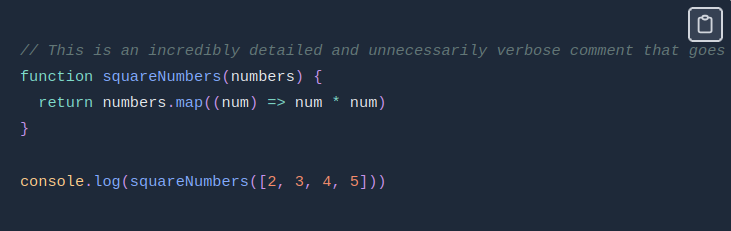
It is not so obvious in the image, but you would need to horizontally scroll to see the rest of the comment! This is likely not what you would want, at least I really wouldn't; I like to have my code examples wrapped, so that anyone could see the code without the need to horizontally scroll.
The solution
To display code examples on a web page, you would likely use <pre> and <code> HTML elements. And as I know, by default, the code won't be wrapped; therefore, a horizontal scroll is likely to happen if your code or comments are long enough. To solve this issue, we can leverage the power of CSS by adding some styles to the <pre><code> combination.
pre code {
  white-space: pre-wrap;
  word-break: break-word;
}
The pre code rule is essential for code blocks (e.g., <pre><code>) to ensure that long lines of code wrap naturally within the container, therefore, preventing horizontal scrolling inside code blocks. The white-space property controls how whitespace and line breaks are handled. Setting it to pre-wrap makes it so that the text within <pre><code> elements keeps the original formatting, while also wrapping the text to the next line when it exceeds the container's width. Thanks to that, there is no horizontal scrolling. The word-break property allows breaking words at arbitrary points if they are too long to fit within the container, so that no single word forces horizontal scrolling. It’s particularly helpful for long strings or unbroken text (e.g., URLs or variable names). The result after applying these styles is as expected in the image below:
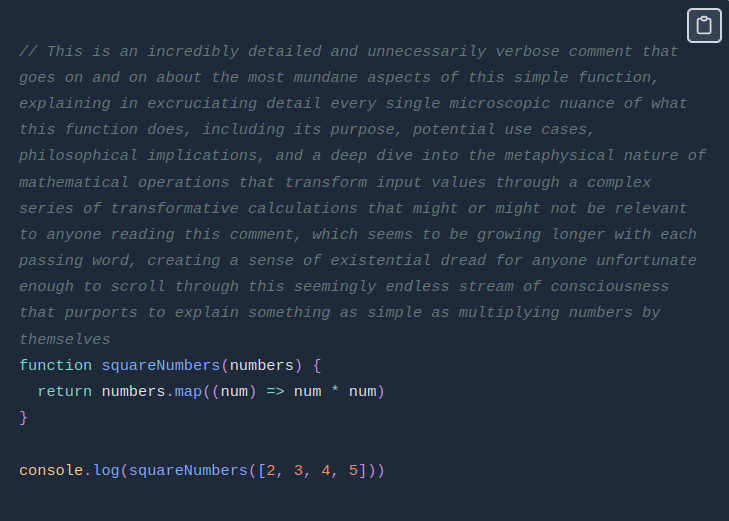
However, in my situation, things weren't so obvious that I needed to style the <pre><code> combination, because I use .mdx files to write stuff, and code blocks are created by using three backticks (```) at the beginning of the code block and the end of it. And it appears that behind the scenes, it uses the <pre><code> combination, so the styles above apply to this as well, which is not really obvious, I guess, and it took me a lot of time to figure that out.
Here you go 😃! This is how you get rid of horizontal scrolling completely in your code examples.
Got questions? Send me an email to commitnobug@outlook.com